Rich Content Formatting
Activity Stream Macro
Activity Stream Macro
What It Does
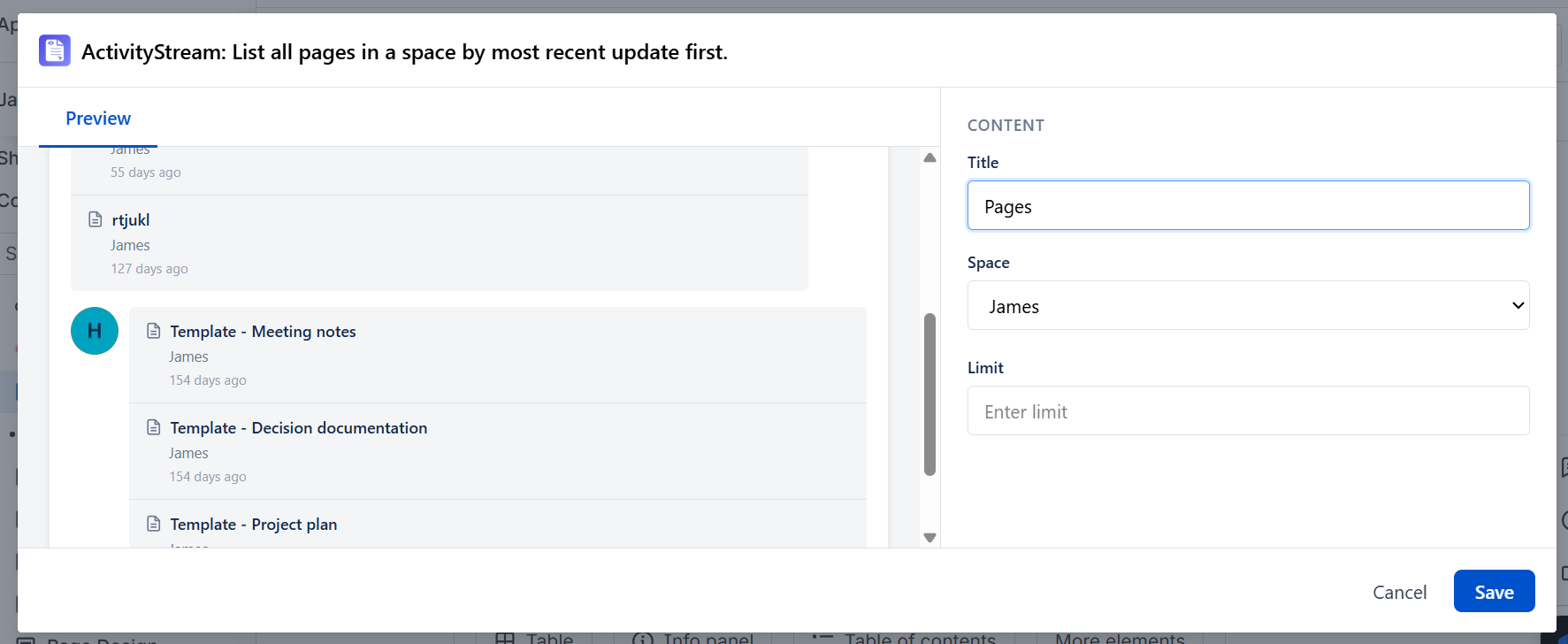
The Activity Stream macro shows recent page activity from a selected Confluence space. Each entry displays the page name, the user who last modified it, and how long ago the change was made - grouped by user avatar. You set a title, choose the space, and set a limit on how many items to show.
How to Set It Up
- Insert the Activity Stream macro on your page
- Enter a Title - this appears as the heading above the activity list (e.g. "Recent Activity")
- Select the Space from the dropdown - the macro shows activity from that space
- Enter a Limit - the number of recent page entries to display
- Publish the page
Configuration Options
| Setting | Description |
|---|---|
| Title | Heading displayed above the activity list - leave blank and "Your title will appear here" is shown as a placeholder |
| Space | The Confluence space to pull recent page activity from (selected from a dropdown of available spaces) |
| Limit | Number of recent page activity entries to display |
What It Shows
The macro renders a list of recently modified pages from the selected space. Each entry shows:
- Page name - clickable link to the page
- User name - the person who last modified the page
- Time ago - how long ago the page was last changed (e.g. 14 days ago, 58 days ago)
Entries are grouped under the user's avatar, so you can see at a glance which user was responsible for which recent changes.
Common Use Cases
- Space home page: Show the team which pages have been updated recently in the space
- Team hub: Display recent page changes from the team's space so members can follow what's being worked on
- Project space: Surface the most recently edited pages in a project space
- Manager view: Choose a specific space to monitor recent documentation activity
Behavior Notes
- Only pages the current viewer has read permission to access are shown
- The activity is pulled from the space selected in the Space dropdown
- Draft pages are not included