Features
Expansions
Expansions control what metadata fields are loaded. Columns, filters, and charts all depend on the expansions you select.
What Are Expansions?
Expansions are metadata groups that load additional field data for each content item in your report. Without loading the right expansion, a column or filter using that field will return empty values.
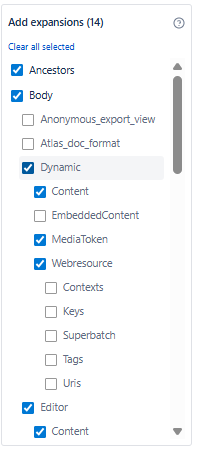
Expansion Categories
| Category | Fields Available |
|---|---|
| Structure | ancestors, children, descendants, container |
| Body & Metadata | body, metadata, operations, restrictions, version |
| History | contributors, lastUpdated, previousVersion, nextVersion, ownedBy |
How to Use Expansions
- Open the macro editor - the Left Panel shows expansion groups.
- Use the Search box to find a specific field by name.
- Check the checkbox next to any group to load its fields.
- Fields immediately become available for column, filter, and chart configuration.
- Star (pin) frequently used fields to keep them at the top.
Best Practices
- Load only what you need - each additional expansion adds fields but also increases data load time
- Use the Search box in the expansions panel to find fields quickly
- Use Favorites to pin commonly used expansions for faster access
- Remove unused expansions before saving to optimize report performance
- Use Explore (center panel) to discover what fields are available after loading expansions
Blank column values? If a column shows empty values, the required expansion is probably not loaded. Use Raw View to confirm the field path, then load the matching expansion.