Features
Columns & Filters
Columns define what data appears in your report. Filters refine which records are shown.
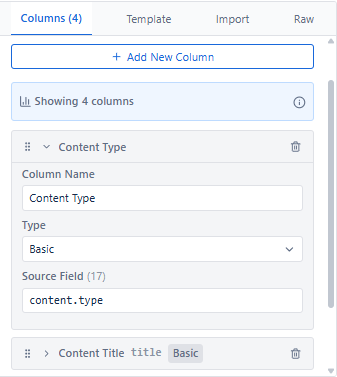
Configuring Columns
Each column has three required settings: Column Label, Block Type, and Data Value (JSON path from loaded expansions).
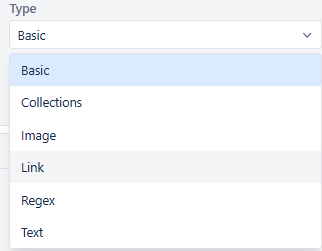
Block Types
| Block Type | Description | Use Cases |
|---|---|---|
| Basic | Standard text/numeric display | Names, IDs, dates, simple metadata |
| Image | Displays images from URLs. Size adjustable with slider (shows px dimensions) | Profile pictures, thumbnails, logos |
| Link | Creates clickable hyperlinks. Combines link text + URL from different fields | Page titles linking to pages, URLs |
| Collection | Handles array/list data. Custom joiners: comma, pipe, newline, etc. | Labels, contributors, tags |
| Regex | Applies regex patterns to extract or transform data | Extracting patterns, data cleanup |
| Text | Enhanced display with prefix/suffix, truncation, case, fallback values | Formatted output, truncated titles |
Column Actions
| Action | Description |
|---|---|
| Add Column | Click '+ Add New Column' to create a new column |
| Edit Column | Modify label, block type, source field, or formatting inline |
| Delete Column | Remove a column using the trash icon |
| Drag & Drop Reorder | Drag the handle icon to change column display order |
| Duplicate Column | Copy an existing column configuration - saves setup time for similar columns |
| Hide Column | Temporarily remove from display without deleting - configuration is preserved |
Applying Filters
Filters refine which records appear in the preview. They run top-to-bottom with AND logic - each row further narrows results.
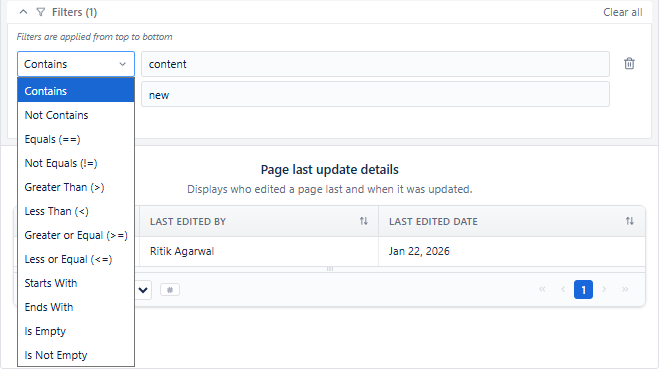
Each Filter Row Has 3 Parts
| Part | Description | Examples |
|---|---|---|
| Operator | How to compare the value | Contains, Equals, >, <, >=, <=, Starts With, Ends With, Regex, Is Empty, Advanced |
| Property | The field to filter on | Title, Space, Created Date, Last Modified, Created By, Content Type |
| Value / Query | What to compare against | "Release Notes", "DEV", currentUser() |
How to Fill a Filter Row
- Pick Operator
- Choose the Property
- Enter the Value / Query
Preview updates using the full stack of filters, top to bottom.
Full Operator Reference
| Operator | Description | Example |
|---|---|---|
| Contains | Field includes the value | Title contains 'Project' |
| Not Contains | Field excludes the value | Title not contains 'Draft' |
| Equals | Exact match | Type equals 'page' |
| Not Equals | Any value except this | Status not equals 'archived' |
| Starts With | Field begins with value | Title starts with 'Release' |
| Ends With | Field ends with value | Title ends with '2024' |
| Greater Than (>) | Numeric/date comparison | Version > 5 |
| Less Than (<) | Numeric/date comparison | Like count < 10 |
| Greater or Equal (>=) | Numeric/date comparison | Created >= 2024-01-01 |
| Less or Equal (<=) | Numeric/date comparison | Like count <= 100 |
| Is Empty | Field has no value | Labels is empty |
| Is Not Empty | Field has a value | Last modified is not empty |
| Regex | Pattern matching | Title matches /Release/ |
| Advanced | Custom expression | Complex multi-field expressions |