Custom Tabular Report
List View
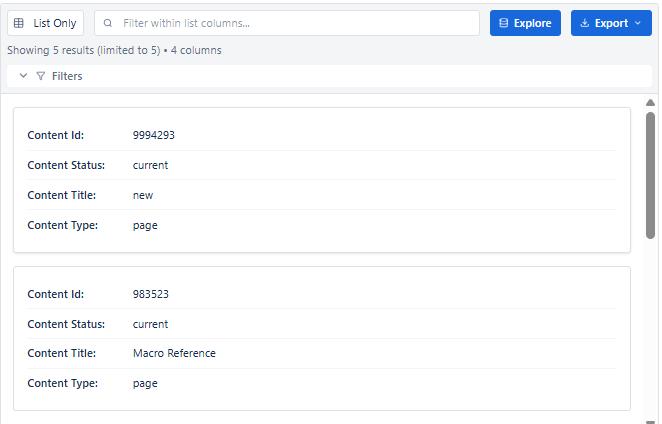
List view shows each Confluence content item as a single card in a clean vertical list. It is ideal for creating readable, human-friendly output - like a page index, task list, or simple directory.
Key Features
| Feature | Description |
|---|---|
| Card-based layout | Each record occupies its own row as a standalone card |
| Field labels inline | Column labels shown next to values for easy reading |
| Image block support | Profile pictures or thumbnails render prominently in each card |
| Link block support | Card titles or fields can be clickable links |
| Pagination | Navigate large lists with Previous/Next controls |
| Inline search | Filter visible items by keyword |
When to Use List View
- Team or people directories - one card per person with name, role, profile picture
- Task or action item lists - clean one-item-per-row layout
- Content indexes - quick overview of pages with key metadata
- Simple space inventories - lightweight listing without heavy table formatting
- Anywhere a table feels too dense - List gives more breathing room per record
Configuring List View
- Set Report Type to List in the header dropdown.
- Load required expansions in the left panel.
- Open the Columns tab - configure columns the same way as Table view.
- Use Image block for profile pictures or thumbnails.
- Use Link block for clickable page titles or URLs.
- Apply filters and set Result Limit as needed.
- Review in Live Preview, then Save.
Best for: Team directories, task lists, content indexes - anywhere each record should stand out as a single readable item rather than a row in a dense table.